We will now create Jobs,Grades,Grade Rate and Positions.
Job:
Navigation: HRMS Manager>Work Structure>Job>Description

To add values in Evaluation we need to enter values in Lookups: EVAL_SYSTEM and EVAL_SYSTEM_MEAS
Evaluation DFF: Additional Evaluation Details.
Grade:
Navigation: HRMS Manager>Work Structure>Grade>Description

Grade Rate: Used to set the Minimum and Maximum value for each Grades in the Organization.
Navigation: HRMS Manager>Work Structure>Grade Rate>Description

Positions:

Job:
Navigation: HRMS Manager>Work Structure>Job>Description

To add values in Evaluation we need to enter values in Lookups: EVAL_SYSTEM and EVAL_SYSTEM_MEAS
Evaluation DFF: Additional Evaluation Details.
Grade:
Navigation: HRMS Manager>Work Structure>Grade>Description

Grade Rate: Used to set the Minimum and Maximum value for each Grades in the Organization.
Navigation: HRMS Manager>Work Structure>Grade Rate>Description

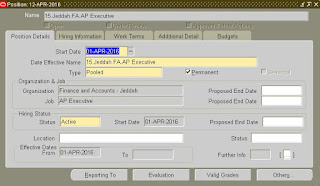
Positions:


Position Types:
Single Incumbent: Can
associate only 1 person like CEO,CFO,CIO of the company
Shared: Defines
how many people are going to share a position
Pooled: One
position can be used by multiple people.
None: No
rules are applied
Full Time Equivalent (FTE) :It is the
maximum limit a position can have in an organization. eg. – an organization can
has only 1 CEO so FTE = 1 and Headcount = 1.Their can be 3 shifts for a single position like Manager so FTE = 1 and
Headcount = 3.
Headcount: The
maximum number of people who can share a position.
